
I’m typing this on my favorite laptop of all time. And I’ve used a lot of laptops.
It’s a Lenovo Thinkpad. It looks just like a Thinkpad - matte black on the outside, lots of ports, best-in-class keyboard, same as it ever was. This is probably the 10th or 12th Thinkpad that I’ve owned and I’ve loved them all.
But this one is the best. You haven’t heard about it yet but there’s a revolution underway in the Windows world and this laptop in front of me, it’s a revolutionary.
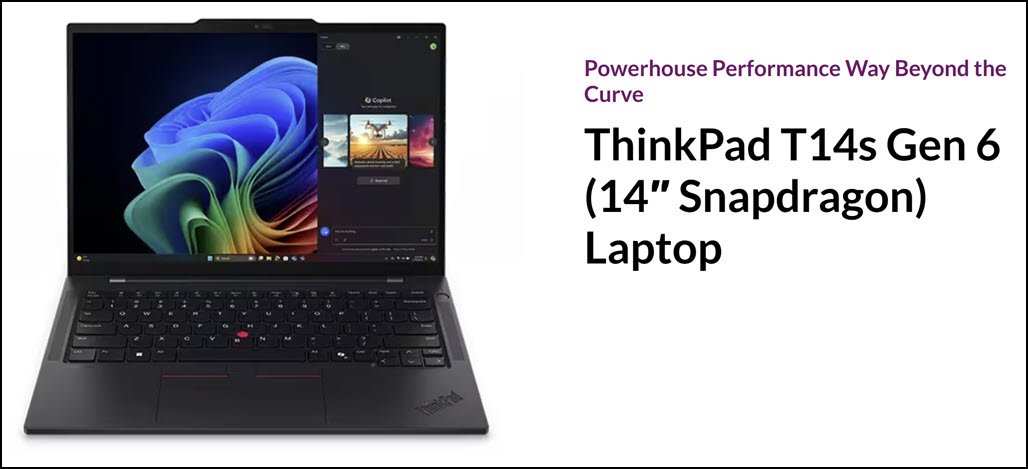
It’s a Lenovo Thinkpad T14s Gen 6 with a Snapdragon processor. The processor is the interesting part. It’s where the revolution is happening.
Let me tell you two stories. One is about me - why does this laptop make me so happy?
Next week I’ll tell you about the transformation in the computer industry as the Microsoft/Intel alliance crumbles.
By the time we’re done, you might decide to join the revolution when you next go laptop shopping.
There are three models of the Thinkpad T14s Gen 6. You can get it with an Intel processor, an AMD processor, or a Snapdragon processor. They all look identical.
Be careful when you go shopping - since it’s Lenovo, there are multiple other laptops with nearly identical names. T14s is not the same thing as a T14. T16 is far bigger and not the same at all. The name “Thinkpad” is currently used for more than 1400 different laptop models, I think, I lost count.
So: Thinkpad T14s Gen 6 with Snapdragon. Accept no substitutions.
I’ve owned oh so many Thinkpad X1 Carbon laptops, I’ve had more than one Thinkpad X1 Yoga with touchscreens. Lenovo Thinkpads are some of the best Windows laptops on the market. I have zero complaints about how well they’re built, about the quality of the screens, or about anything else relating to the hardware.
But I have a problem with Windows on Intel processors - the “Wintel” alliance that has powered our desktop computers and laptops for more than thirty years.
Battery life sucks on Windows laptops with Intel processors.
They run hot, sometimes alarmingly so.
And sleep is unreliable - always has been, apparently always will be. When you close the lid, you have no idea what to expect when you raise it the next time. Maybe it will start quickly, maybe it will start after 60 seconds, or maybe your backpack will be hot because the laptop never went to sleep at all and you have no battery.
In the last few years I’ve been worn down by Bluetooth paranoia on the Windows laptops, trying to remember to manually turn off Bluetooth before I shut the laptop lid for fear the battery would drain overnight on my computer and my headphones. I was frustrated over and over and over when I discovered I had no charge left in a client’s office, or on the plane when I wanted to watch a movie and the goddam battery was dead.
It drove me crazy - so crazy that I bought a Macbook Air in early 2024, my first Mac.
Macbook Airs are miracles. I grew up with DOS and Windows, I was a Windows consultant and evangelist for 25 years, but my god, Apple deserves every bit of credit it gets for what it has done with Macbooks since it started making its own processors. It is magical to raise the lid and see the screen light up before it’s fully raised, with the same battery as the night before, or a week or a month before.
The Apple legend was true. The Macbook Air just worked. Long battery life, no fan, never any worry about waking from sleep. It was so relaxing!
Switching from Windows to MacOS was weird. I had to retrain decades of muscle memory to use the Command and Option keys, to reach for the opposite corner to close a window, to use Finder and Spotlight to track down files.
But I’m a nerd and I like that kind of challenge. Quickly I could do everything on the Mac that I had done on my Windows laptops. Thanks to Google Drive and OneDrive and all the other online services syncing my info, it was seamless to go back and forth between my Windows desktop and Mac laptop.
Why I came back to Windows
Two things brought me back to Windows.
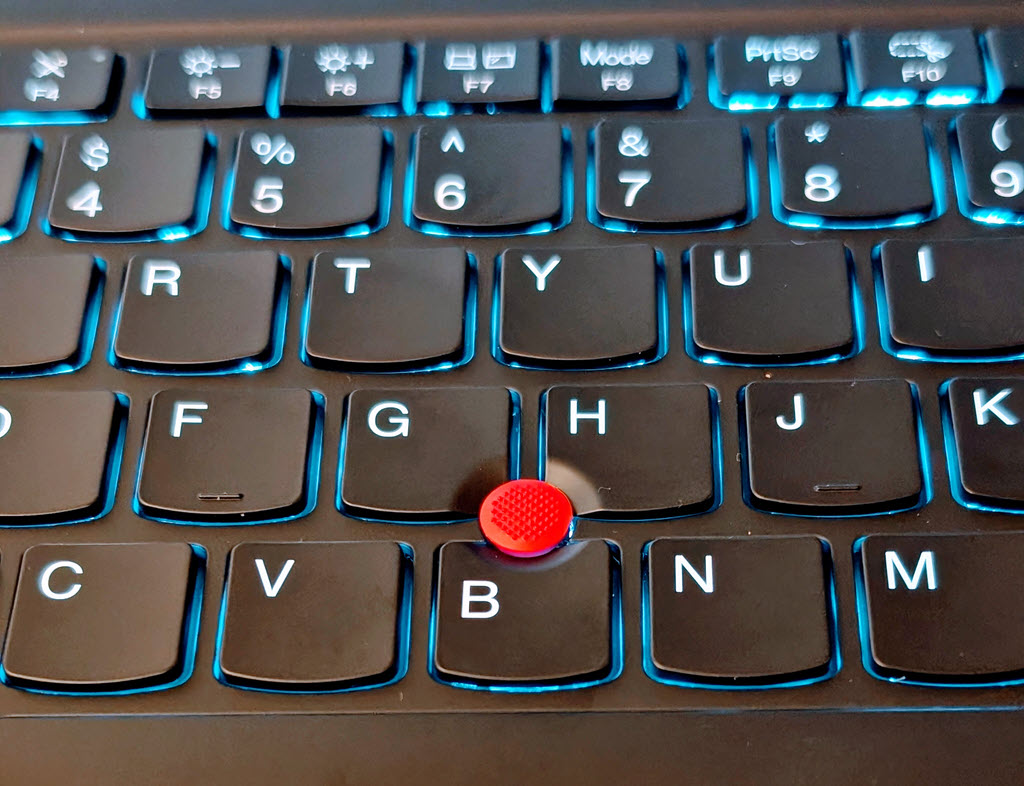
The first is the Trackpoint, the little red nubbin in the middle of the Thinkpad keyboard. It works like a tiny joystick to move the mouse cursor. There are left and right mouse buttons where your thumbs naturally fall below the space bar. Trackpoint aficionados make the mouse cursor fly around the screen without ever taking their hands off the keyboard.
Lenovo has included the Trackpoint on its Thinkpad laptops for decades but only a small number of people use that Trackpoint nubbin. Possibly twelve people worldwide. I have never personally met anyone else who has used the Trackpoint. Until I looked it up in Wikipedia, I wasn’t aware that some people call it the “clit mouse” and “nipple mouse” but the thought makes me happy.
I can’t help it. After I got the Macbook Air, I missed the Trackpoint every day.
The Mac trackpad is best in class. Whatever problems I had were my problems, no blame for anyone except me, I’m old and stuck in my ways. But I could not get used to using only a trackpad to move the mouse around, with no Trackpoint and no touchscreen.
I experimented with every setting for clicking and dragging on the Mac, an admirable array of options but none of them quite right. I got an external mouse - not a bad answer but frequently clumsy when I wanted to use the laptop quickly or in a place where a mouse wouldn’t fit (forget working on a plane tray table).
I couldn’t get the Trackpoint out of my head.
Okay, that’s just me. You don’t use a Trackpoint. Nobody does. I’m used to the look that people give me when I mention it.
So for you the important part is my second reason for coming back to Windows: the introduction of Snapdragon laptops, which bring the advantages of Macs - long battery life, reliable sleep and startup, low heat - into the Windows world.
Opening my Snapdragon laptop is like picking up an iPad. It starts instantly and the camera recognizes my face before the lid is all the way up. I’ve never seen anything like it on Windows. The battery is unchanged from the day before and it lasts for many hours.
Doing work on a Snapdragon laptop is literally almost identical to using a laptop with an Intel processor, but without fan noise or heat.
But let’s talk about that word “almost.” Snapdragon processors are quite different from Intel processors under the hood. Microsoft and Qualcomm (manufacturer of Snapdragon processors) have done a lot of work to make the experience seamless for most people, including almost all of you, dear readers.
I’m going to describe how I use a laptop. I know you and I love you all and I can state with certainty that ninety-five percent of you are exactly the same as me. If you nod your head to all of this, then Vive la revolucion, start looking forward to your next Snapdragon laptop.
But if your needs are different, if you’re the exception to any of these blanket statements, then a laptop with a Snapdragon processor might still work but do the research to be sure.
I use the operating system that comes with the computer. I don’t install Linux or run elaborate virtual machines.
Almost all my time is spent with a few off-the-shelf programs from major manufacturers. Half of my time or more is spent in Chrome or its offshoots. I use Outlook and Word, Adobe Photoshop Elements, Spotify for music, Plex for video, Snagit for screen captures, a few others. Nothing obscure or sketchy.
I don’t play games on a laptop. Games are a very specialized world and life is easier if you simply decide they won’t work on a laptop, close book, end of story. Gaming on Snapdragon is nuanced, of course, but it’s easier to assume it won’t work.
I don’t plug anything into a port on the laptop - no scanner, no odd USB devices, not even a docking station. Most peripherals work on Snapdragon but it’s the current weak spot.
If you are a special snowflake and any of those things are different for you, don’t buy a Snapdragon laptop without double-checking.
In the next article we’ll go through a little history of Microsoft’s previous attempts to bring the Snapdragon tech to the Windows world, and why Intel is closer to the brink of breakup or bankruptcy than you realized.